I decided to revisit my AnchorSizer class because basically I just dragged the old ssAnchorSizer from ssClasses then dropped it to my ssUltimate library, and simply renamed it (as well as GridSort and GridLock).  My focus back then is on other new classes I was planning to make for ssUltimate and so I simply moved those ones there.

Today though, I decided to revisit my codes there... and I winced, LOL!  And shuddered too, which is what we normally experience for the sheer horror of seeing our old codes after learning better ones.  Anyway, I cannot simply remove that AnchorSizer anymore as others may be using those already plus while I do not like (now) the codes I used there and the way I manipulate resizing, those nevertheless work good on the resizing need.

So instead I created a new and better Sizer class for the insides of listbox, combobox and grid and named it simply as AnchorX.  So what has been changed here?
Saturday, January 14, 2017
AnchorX
Saturday, January 7, 2017
DTPeriod Class
This is two dtPickerX class for our two dates need (from and to). This is quite simple. Drop this class on your form and choose its orientation, 1 for portrait (default) and 2 for landscape.
Why not logical? Instead of 1 for portrait, why not use .T. and .F. for landscape? Well I plan to create a 3rd look for this later when I got time.
This returns two (2) values, i.e., ValueFrom and ValueTo which are already self-explanatory. Since dtPickerX now has that HotKey, then this one has that too. It automatically switch values ensuring that ValueFrom will always have the lowest or equal value than ValueTo, removing your need to code those yourself.
On form, during developing, you will only see one (1) dtPicker. But on runtime, it will be shown like any of these depending on your orientation.
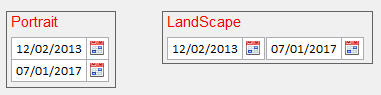
And Oh, you can assign initial values on those too:
As usual, I am open to suggestions and comments for the betterment of the library from existing subscribers or even from those who plan to subscribe but is wishing some features I have not created yet.
Cheers!
See what's on ssUltimate:
http://sandstorm36.blogspot.com/2015/12/whats-on-ssultimate-library.html
Why not logical? Instead of 1 for portrait, why not use .T. and .F. for landscape? Well I plan to create a 3rd look for this later when I got time.
This returns two (2) values, i.e., ValueFrom and ValueTo which are already self-explanatory. Since dtPickerX now has that HotKey, then this one has that too. It automatically switch values ensuring that ValueFrom will always have the lowest or equal value than ValueTo, removing your need to code those yourself.
On form, during developing, you will only see one (1) dtPicker. But on runtime, it will be shown like any of these depending on your orientation.
And Oh, you can assign initial values on those too:
* DtPeriod Init
this.valuefrom = DATE(2013,2,12)
DODEFAULT()
Date Scoping
Min and Max Values. Two properties I added just now are ValueMin and ValueMax. Those are optional. If you leave both empty, then there is no scope restriction. If you set just the ValueMin to say DATE(2013,1,1) or Date()-90 or GoMonth(date(),-3), then the dtpickers can not go lower than that. If you also set ValueMax to a date, then the pickers will be restricted to those scope.
Min and Max Values. Two properties I added just now are ValueMin and ValueMax. Those are optional. If you leave both empty, then there is no scope restriction. If you set just the ValueMin to say DATE(2013,1,1) or Date()-90 or GoMonth(date(),-3), then the dtpickers can not go lower than that. If you also set ValueMax to a date, then the pickers will be restricted to those scope.
As usual, I am open to suggestions and comments for the betterment of the library from existing subscribers or even from those who plan to subscribe but is wishing some features I have not created yet.
Cheers!
See what's on ssUltimate:
http://sandstorm36.blogspot.com/2015/12/whats-on-ssultimate-library.html
Thursday, December 22, 2016
CtrlBox Class
This is another simple class that has been inside ssUltimate for quite a long time now. But I designed this solely for the need of TitleBarX when I experimented on creating a control box that is purely made of shapes.

However, recently I am changing my forms' appearances again and I now favor a form with no titlebar and border that is run maximized. And while users of my app know they can always press Esc key to exit any of my forms, I still want an additional way for them to close it via a mouse.
Wednesday, November 30, 2016
RTF Keyword Highlighting
In 2009 I started playing with an RTF control and I created one organizer for my own need to store articles and any other useful info I can find in the web for later offline reading and reference. I decided to do that because most of the time we don't have good internet here.
Well I was reworking the previous days on that old DevOrg app which consisted of a treeview and an RTF activeX controls as I decided to finally give it a filtering capability, insertion of image with rescaling and quality reduction, reworking the icon panel to look like a ribbon, etc.; and along the way, I thought of allowing it to highlight the words I typed to filter the threads and nodes of treeview. So I can see outright where those are, like this:

The trick is to work behind the scene on its RTF codes. Here is the method I created for that:
Well I was reworking the previous days on that old DevOrg app which consisted of a treeview and an RTF activeX controls as I decided to finally give it a filtering capability, insertion of image with rescaling and quality reduction, reworking the icon panel to look like a ribbon, etc.; and along the way, I thought of allowing it to highlight the words I typed to filter the threads and nodes of treeview. So I can see outright where those are, like this:

The trick is to work behind the scene on its RTF codes. Here is the method I created for that:
Monday, November 14, 2016
HoverButton Class
Another button class for my need which may come handy to my subscribers as well.
So why make another one? What is the main difference with this one vs say ButtonX?
On my BizCore ERP app, I use TreeView for my menu as I can easily control there what can be shown per user by hiding/removing nodes they should not be of concern. See ERP app below:

So why make another one? What is the main difference with this one vs say ButtonX?
On my BizCore ERP app, I use TreeView for my menu as I can easily control there what can be shown per user by hiding/removing nodes they should not be of concern. See ERP app below:

Thursday, November 10, 2016
Tick/Untick Checkboxes on Grid with AllowCellSelection = .F. - Part II
Last time I have shown how to employ ticking/unticking of checkboxes on Grid with AllowCellSelection = .F. via utilizing MouseDown event of Grid. So what makes this different than the first trick? The first trick relies on Relative Column of Grid. And this poses a problem when the columns are reordered via dragging into new position as Relative Column will then change.
So it is not that foolproof and only will work when you don't rearrange the column orders. This one though fixes that as this is no longer based on the relative column's position but will be basing on the ControlSource of that column.

Here is the sample code:
So it is not that foolproof and only will work when you don't rearrange the column orders. This one though fixes that as this is no longer based on the relative column's position but will be basing on the ControlSource of that column.
Here is the sample code:
Monday, October 31, 2016
Sketches
Sorry, this is not about software developing. I just wanted to create this entry here for my latest hobby which is pencil drawings.
When I was young (in elementary and highschool), I used to draw using a ballpen. Then I stopped as my focus went elsewhere. That was 29 years ago.
Last month, for whatever reason I decided to see if my hands are still there. So I ordered a pastel color pencil in ebay and started making some sketches where immediately after completion, I posted it on my wall. And while I deem my output as elementary, my friends say they love those.
Since I realize I don't have the patience required of a real artist as I want to draw and finish whatever I am working within just a few hours, I put aside my pastel (I realize that requires patience) and I decided to work on pure pencils as making shadows there are easier. While I do not have the proper grades (I lack 7b, 8b and 9b for darker ones), my friends also loved those as well so they started requesting I draw them. And I did.
One time I decided to draw my departed brother. Heck if I can take time to draw my friends, I will spend time to draw my loved ones too. I have to draw him twice before I believe I got an acceptable output. Today I decided to see how it will look like when in color.... so Photoshop color layering. Below is the source pencil and photoshop output


When I was young (in elementary and highschool), I used to draw using a ballpen. Then I stopped as my focus went elsewhere. That was 29 years ago.
Last month, for whatever reason I decided to see if my hands are still there. So I ordered a pastel color pencil in ebay and started making some sketches where immediately after completion, I posted it on my wall. And while I deem my output as elementary, my friends say they love those.
Since I realize I don't have the patience required of a real artist as I want to draw and finish whatever I am working within just a few hours, I put aside my pastel (I realize that requires patience) and I decided to work on pure pencils as making shadows there are easier. While I do not have the proper grades (I lack 7b, 8b and 9b for darker ones), my friends also loved those as well so they started requesting I draw them. And I did.
One time I decided to draw my departed brother. Heck if I can take time to draw my friends, I will spend time to draw my loved ones too. I have to draw him twice before I believe I got an acceptable output. Today I decided to see how it will look like when in color.... so Photoshop color layering. Below is the source pencil and photoshop output


Well I think I have done good here.
Subscribe to:
Posts (Atom)